
Testing Tool-Calling LLMs with Adaptive Random Inputs
Measuring Tool Call Accuracy to catch brittle agent behavior before it ships

There is a quiet failure mode that appears only after you ship your LLM prompt.
Your “agent” works well on your three hand-picked examples. It calls the right tool, returns plausible telemetry, and the response text looks clean.
Then a new pattern of log line shows up in production. The model calls the wrong tool, or calls no tool at all, and your incident triage starts drifting away from reality.
This article is about building a small, concrete harness that makes these failures appear earlier, on your laptop, before users see them.
The two ideas are:
Use Adaptive Random Testing (ART) to spread test prompts across the input space instead of poking at a few convenient examples.
Track a simple, focused metric, Tool Call Accuracy, that tells you how often the model uses the correct tool under that distributed set of inputs.
We will walk through a complete Python script that tests a multi-tool triage prompt, section by section, and see how ART and Tool Call Accuracy work in practice.
The problem: evaluating tool-calling prompts
The example scenario is a common one.
You have an LLM that triages incidents across several backend services. Each log line starts with a tag like [AUTH] or [BILL], and the model must:
Choose the telemetry tool that matches the tag.
Call it exactly once.
Use the tool’s JSON output to summarize service health.
If the model calls the wrong tool, or skips the tool call and guesses, the summary is misleading.
Manually testing this prompt usually means writing a small list of log lines and checking the responses by eye. The problem is that the space of possible log lines is huge: different tags, regions, error phrases, queue metrics, and lengths.
You need a way to:
Explore that space more systematically.
Quantify how often the model routes tools correctly across a wide variety of logs.
This is where Adaptive Random Testing and Tool Call Accuracy help.
Adaptive Random Testing
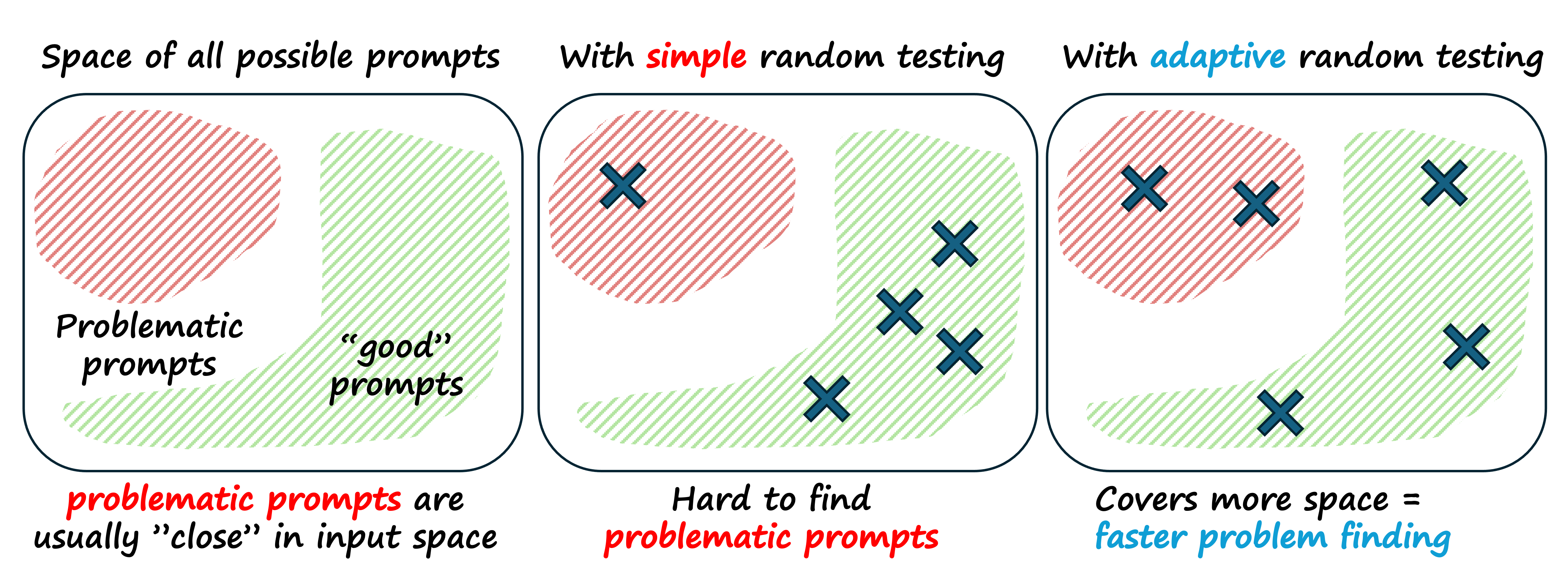
Adaptive Random Testing (ART) is a test generation strategy.
The idea is:
Generate random candidate inputs.
Measure how “far” each candidate is from the inputs you have already tested.
Prefer candidates that are far away.
Distance can be defined in several ways. In the example script, distance between two log lines is the Levenshtein edit distance on the raw strings.
This simple rule produces a set of test inputs that are more evenly spread across the space. If failures cluster in regions of that space, ART tends to discover them earlier than pure random testing.
Defining Tool Call Accuracy
For tool-using prompts, a very natural metric is Tool Call Accuracy.
Definition:
Tool Call Accuracy = (number of tool calls that match the correct tool for the input) ÷ (total number of tool calls made)
In our incident triage example, each log line begins with a subsystem prefix like [AUTH]. This prefix defines the ground-truth tool that should be called.
For example:
Input starts with
[AUTH]→ correct tool ispull_auth_telemetry.Input starts with
[BILL]→ correct tool ispull_billing_telemetry.
Every time the model makes a tool call, we check whether the tool name corresponds to the prefix in the input. Each call is counted as either correct or incorrect, and the ratio gives Tool Call Accuracy.
You should measure this metric because:
Tool calls represent side effects in your system (queries, writes, alerts).
Users often cannot see which tool was called, only the final natural-language summary.
A model that explains failures well but calls the wrong tool is still unsafe.
ART gives you a set of diverse inputs. Tool Call Accuracy tells you how often the model behaves correctly on that set.
A running example: multi-service incident triage
The script you provided sets up a small world where we can safely experiment.
At a high level it:
Defines a prompt for multi-service triage with tools.
Simulates telemetry tools that return structured JSON.
Generates random log lines with different prefixes and bodies.
Uses a Fixed-Size Candidate Set (FSCS) ART strategy to spread tests.
Calls the model with tools on each generated log line.
Extracts tool calls, classifies them as correct or incorrect, and computes Tool Call Accuracy.
Let us walk through the script section by section.
Prompt template and system prompt
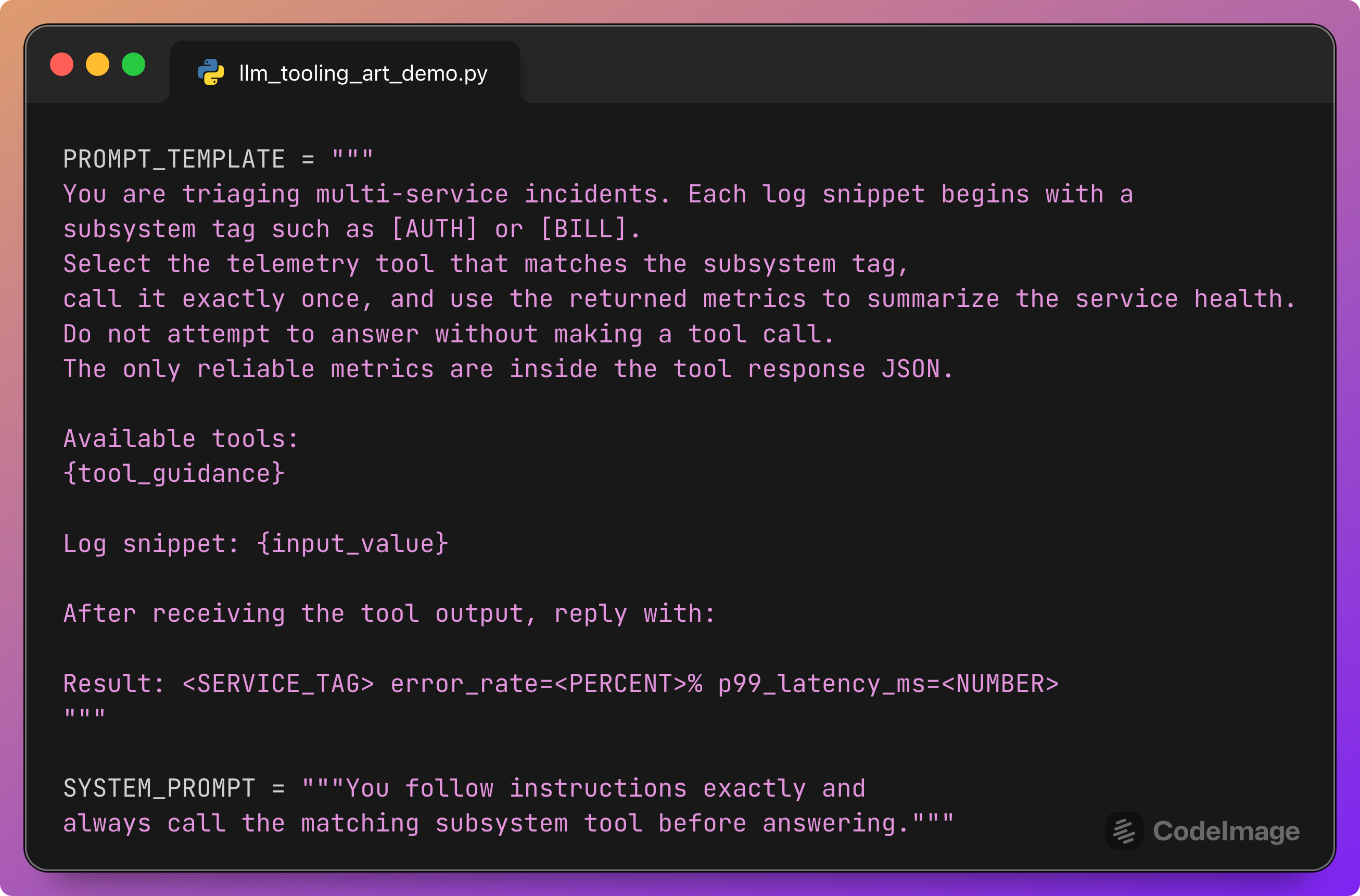
This section defines the contract that the model must follow.
The user message tells the model:
What each log snippet looks like (a subsystem tag at the start).
What action to take (select the matching tool, call it exactly once).
What constraints apply (no answering without a tool call, metrics come only from JSON).
What output format to use.
{tool_guidance} will be filled with a list of available tools. {input_value} will be filled with the generated log line.
The system prompt adds a strong behavioral bias: “you always call the matching subsystem tool.” This is exactly the behavior we will test automatically with Tool Call Accuracy.
Tool variants and tool definitions
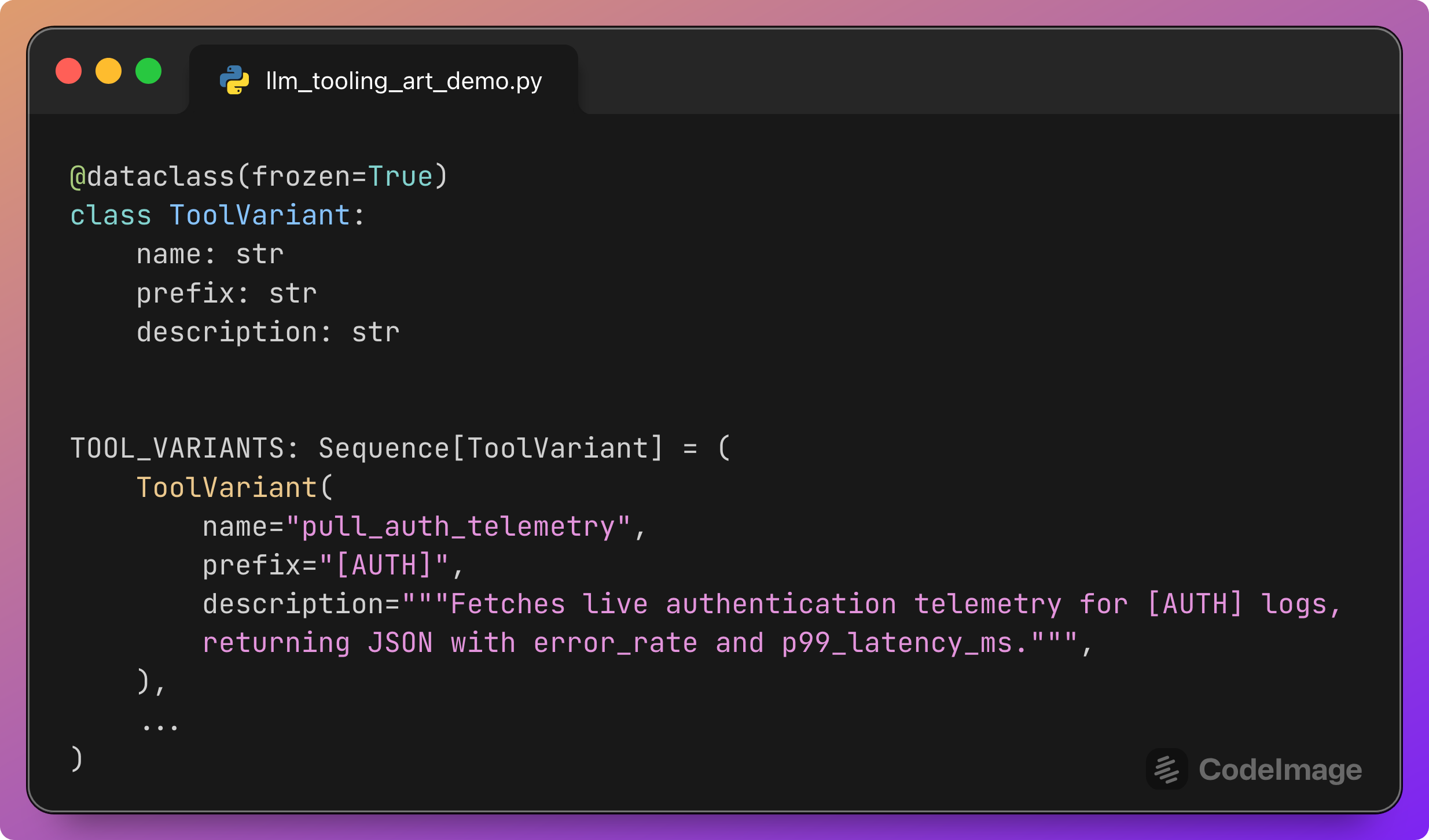
This section defines the catalog of tools.
Each ToolVariant has:
A
namethat the model uses in the tool call.A
prefixthat indicates the subsystem tag such as[AUTH].A
descriptionthat will appear in the prompt.
The TOOL_DEFINITIONS list then converts these variants into the JSON schema expected by the responses API:
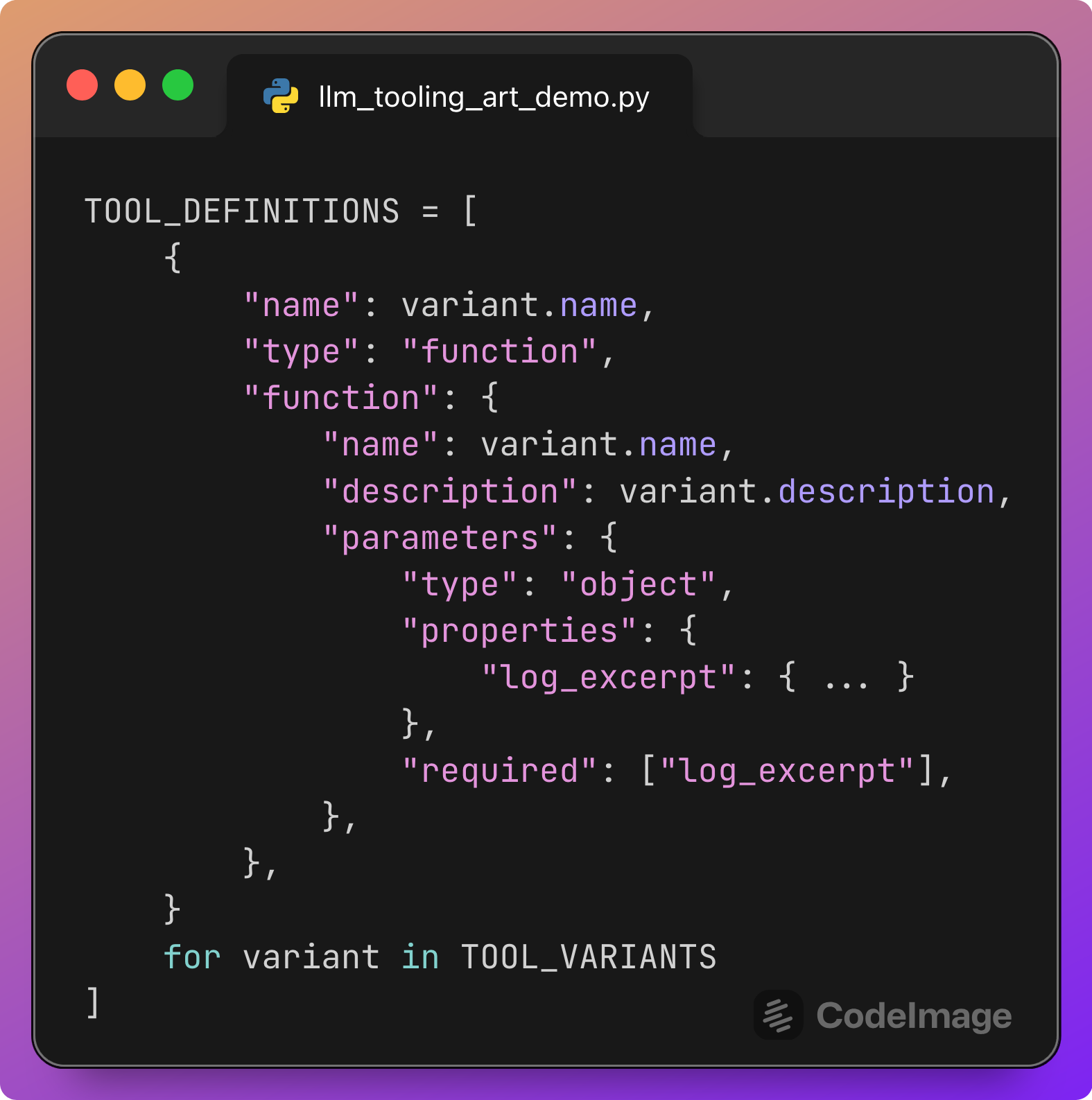
This is what makes tool use testable. The model must choose one of these named tools to proceed.
Two helper structures are also introduced:

These mappings let the harness:
Infer, given a tool name, what prefix it is associated with.
Randomly choose prefixes when generating log lines.
They also provide the ground truth needed to compute Tool Call Accuracy.
Checking whether a tool matches an input
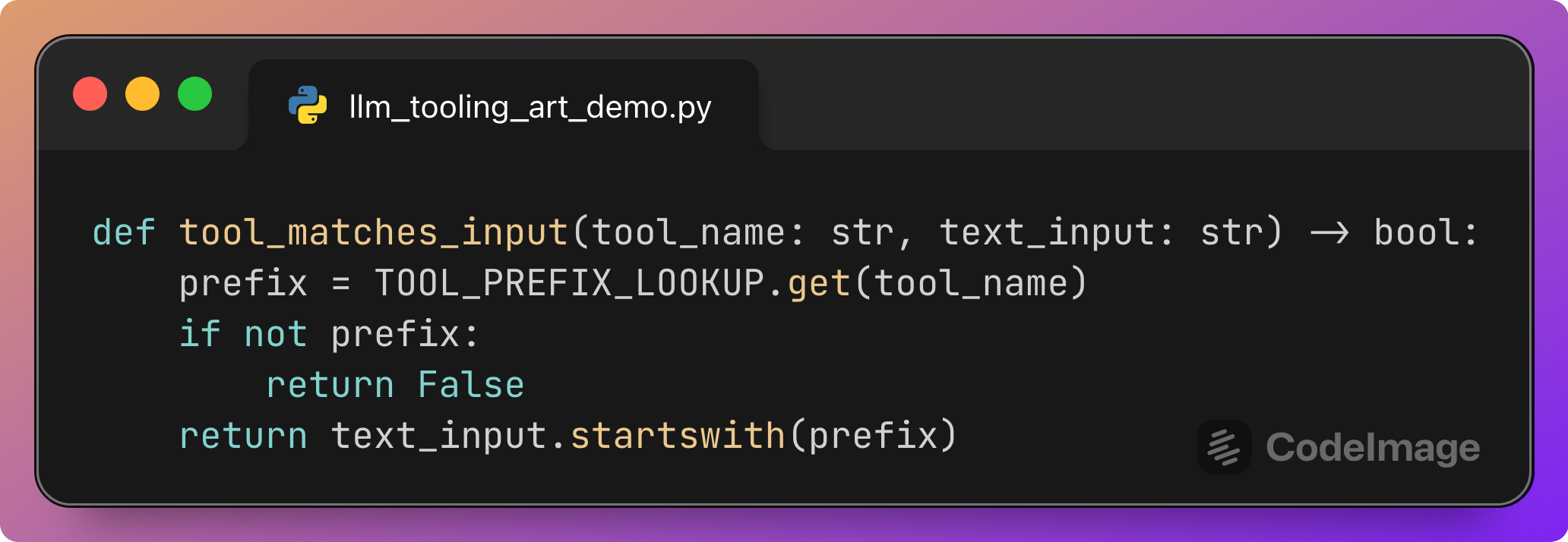
This small helper encodes the oracle for correctness.
A tool call is considered correct if:
The tool name appears in the lookup.
The input log line
text_inputstarts with the corresponding prefix.
For example:
tool_name=”pull_auth_telemetry”andtext_inputbegins with[AUTH]→ correct.tool_name=”pull_billing_telemetry”andtext_inputbegins with[AUTH]→ incorrect.
Every tool call recorded during testing passes through this function to label it as correct or incorrect.
Simulating telemetry tools
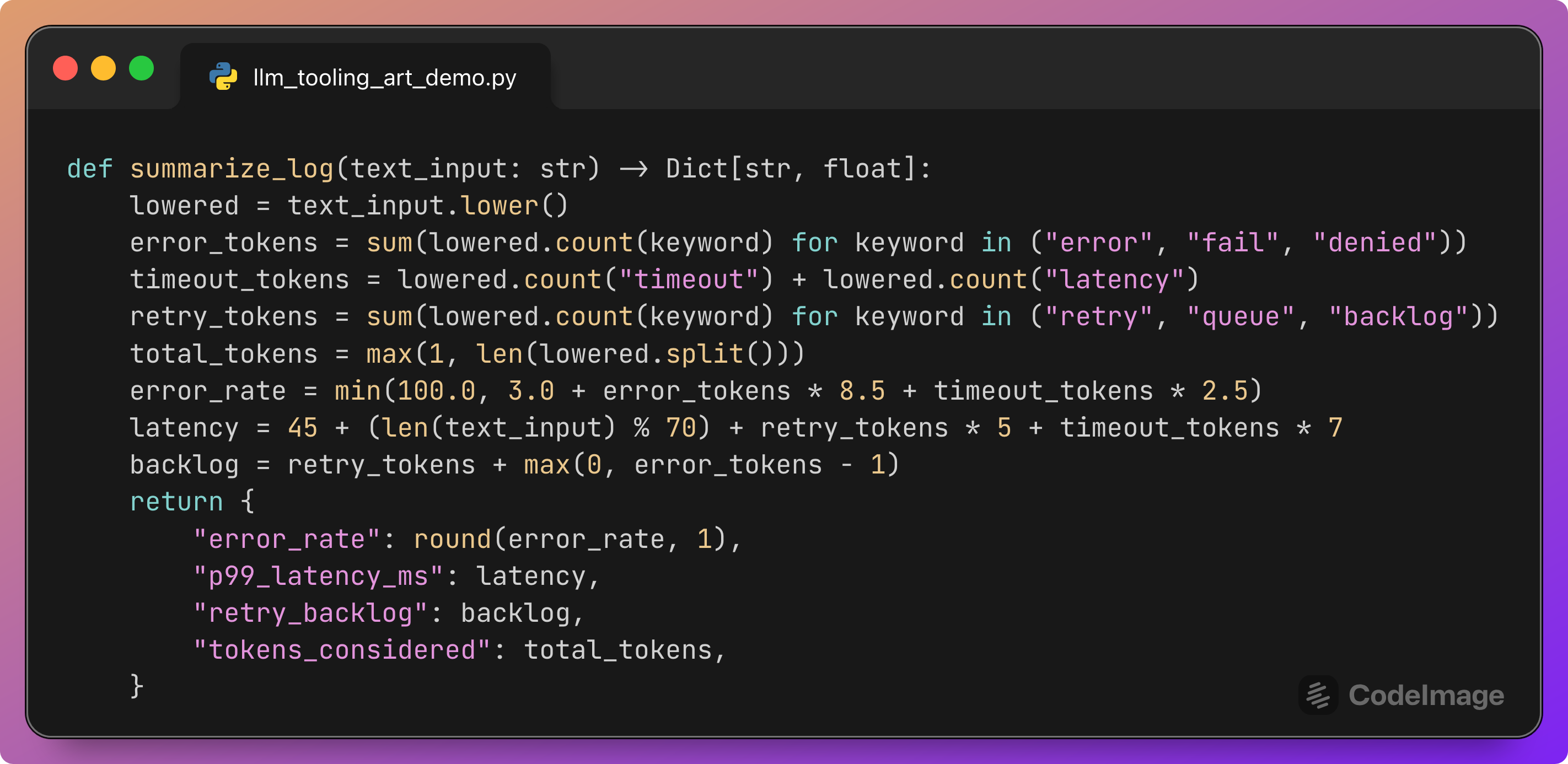
Real telemetry tools would query metrics systems. For evaluation, we only need consistent and plausible JSON output.
This function:
Counts text features such as “error”, “timeout”, “retry”, “queue”.
Uses simple arithmetic to derive an
error_rate,p99_latency_ms, and aretry_backlog.Returns a small JSON-like dictionary that mimics a real telemetry response.
The important property is that the same log excerpt always produces the same metrics. The model can then learn to rely on the tool output to fill in the required fields in the final Result: ... line.
Since our main focus is tool selection, the exact formula is less important than the fact that the tool exists and behaves deterministically.
Extracting tool events from the final response
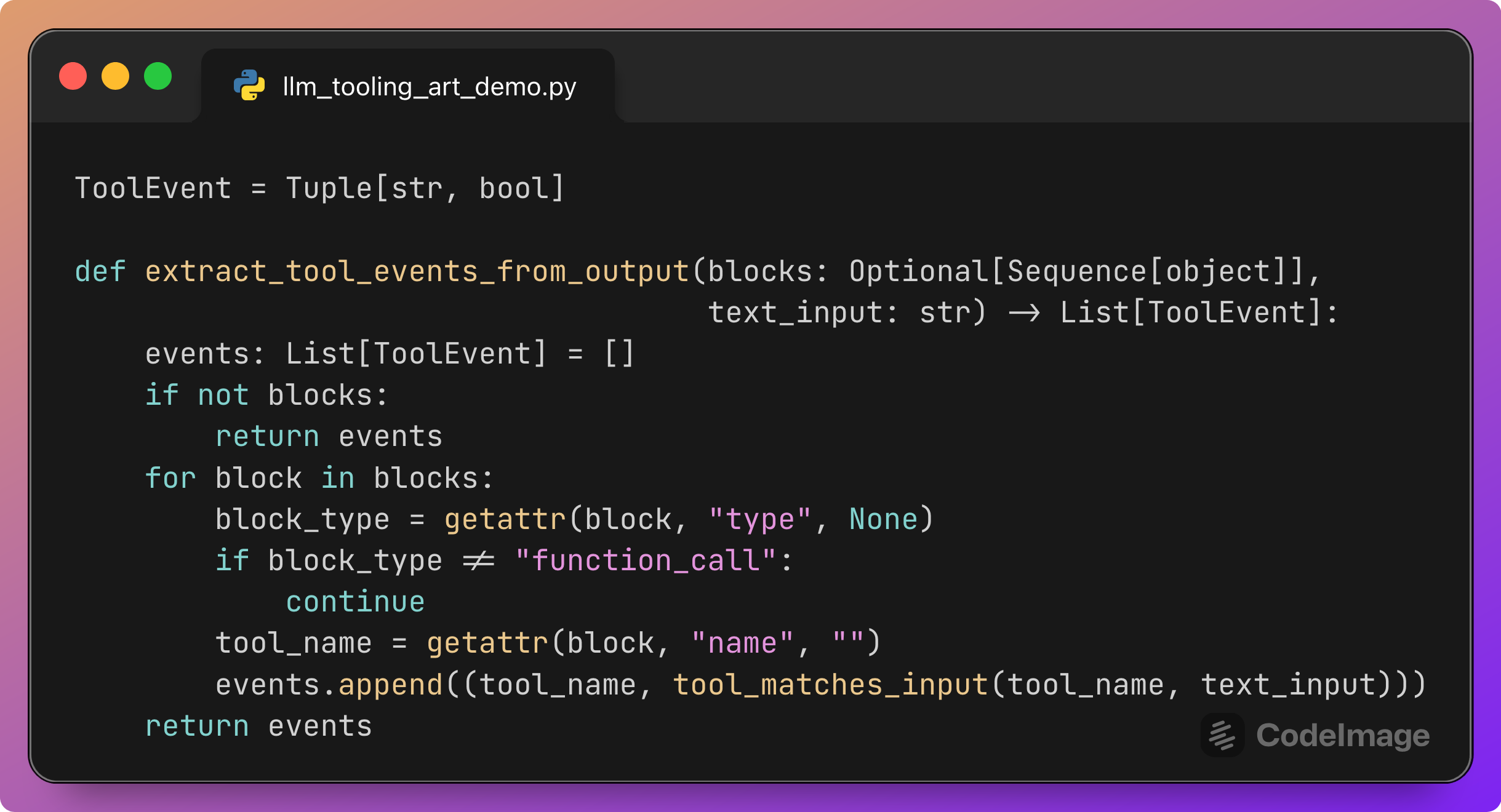
The responses API may also describe tool calls inside the final response.output. This helper scans these blocks and records each tool call as a ToolEvent:
tool_nameis the name of the function called.The boolean flag is whether that tool matches the input according to
tool_matches_input.
These events will later contribute to the Tool Call Accuracy counts.
The script collects tool events both:
While tool calls are being executed.
From the final output, just in case the model expresses tool calls there as well.
Calling the model with tools
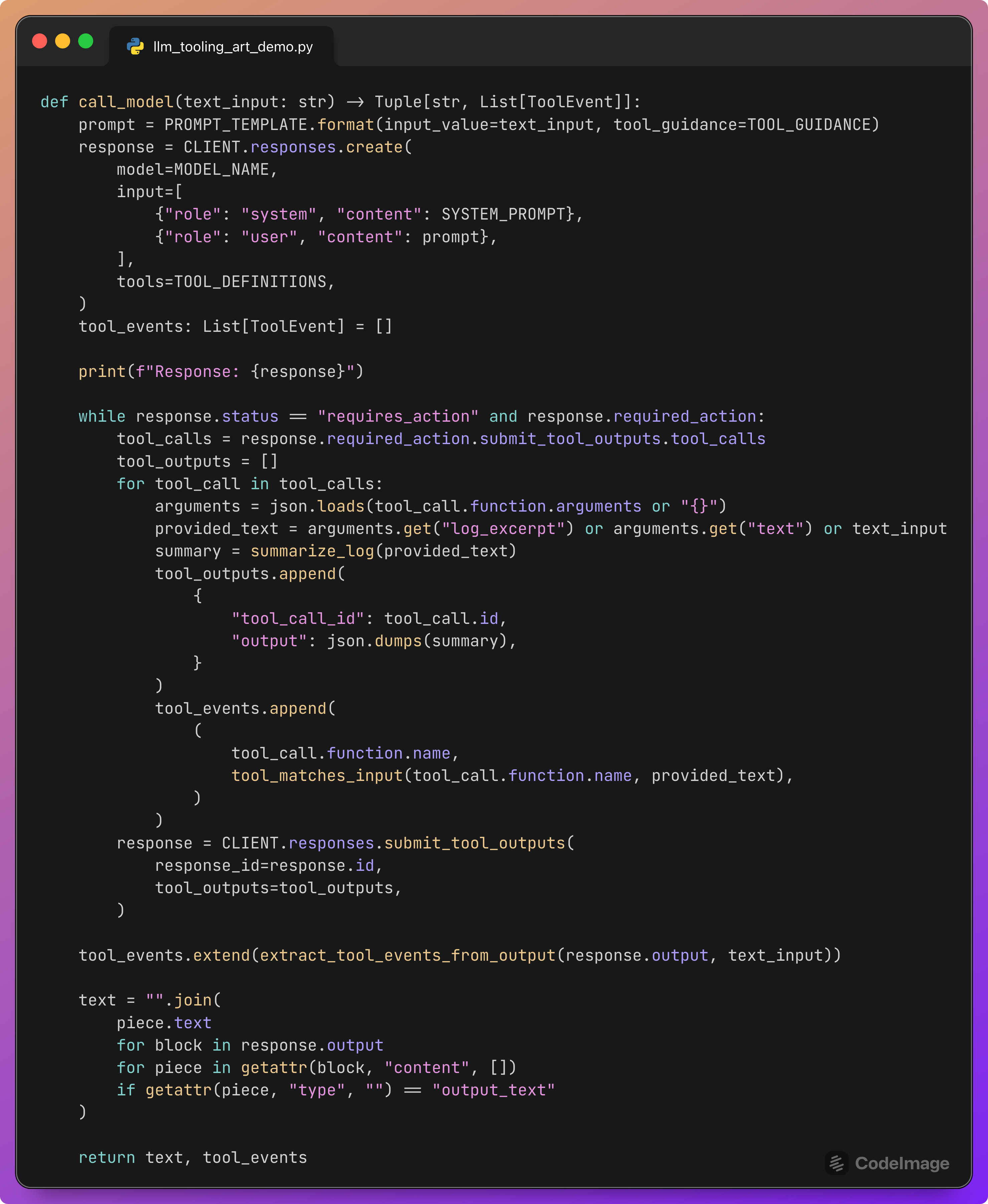
This function is the bridge between test harness and model.
Steps:
Construct the full prompt for this log line using
PROMPT_TEMPLATEandTOOL_GUIDANCE.Call the model with the system and user messages plus the declared
TOOL_DEFINITIONS.While the response is in the
requires_actionstate, read the pendingtool_calls.For each call:
Parse the JSON arguments.
Derive the
log_excerpttext that the tool is working on.Call
summarize_logto generate a synthetic telemetry JSON.Record a
ToolEventwith the tool name and correctness flag.Prepare the tool output payload.
Submit the tool outputs back to the
responsesAPI.After the tool loop finishes, extract any remaining tool events.
Extract the final natural-language text by concatenating
output_textpieces.Return
(text, tool_events).
For our purposes, the key output is tool_events. This lists every tool the model tried to call on this log line, tagged as correct or incorrect.
Generating random log lines
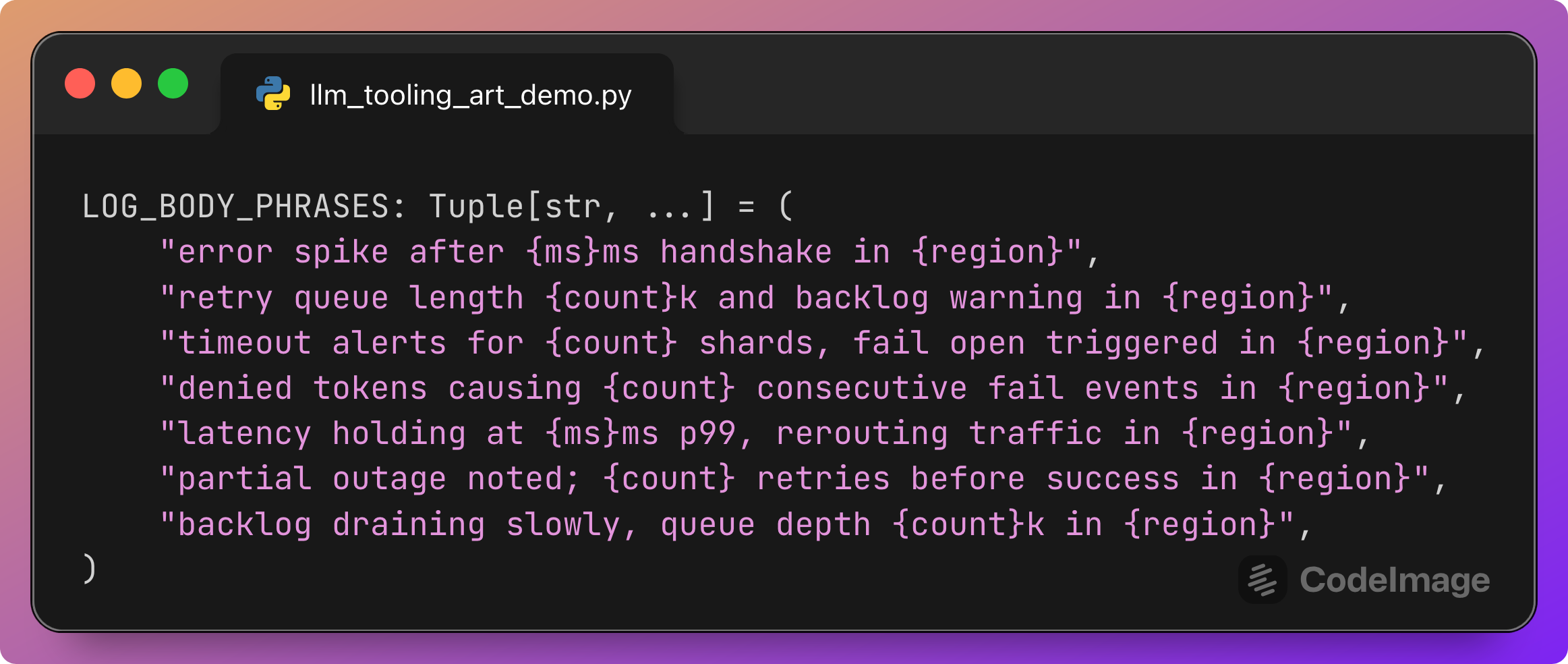
Each phrase describes a segment of the log body with placeholders for numbers and a region. Notice that {region} is later filled using TOOL_PREFIXES, which are the same tags used for subsystems. Note that this may cause the model to fail in calling the correct tool; the model should find the correct tool from the beginning of the log line, not from the end.
The generator function:
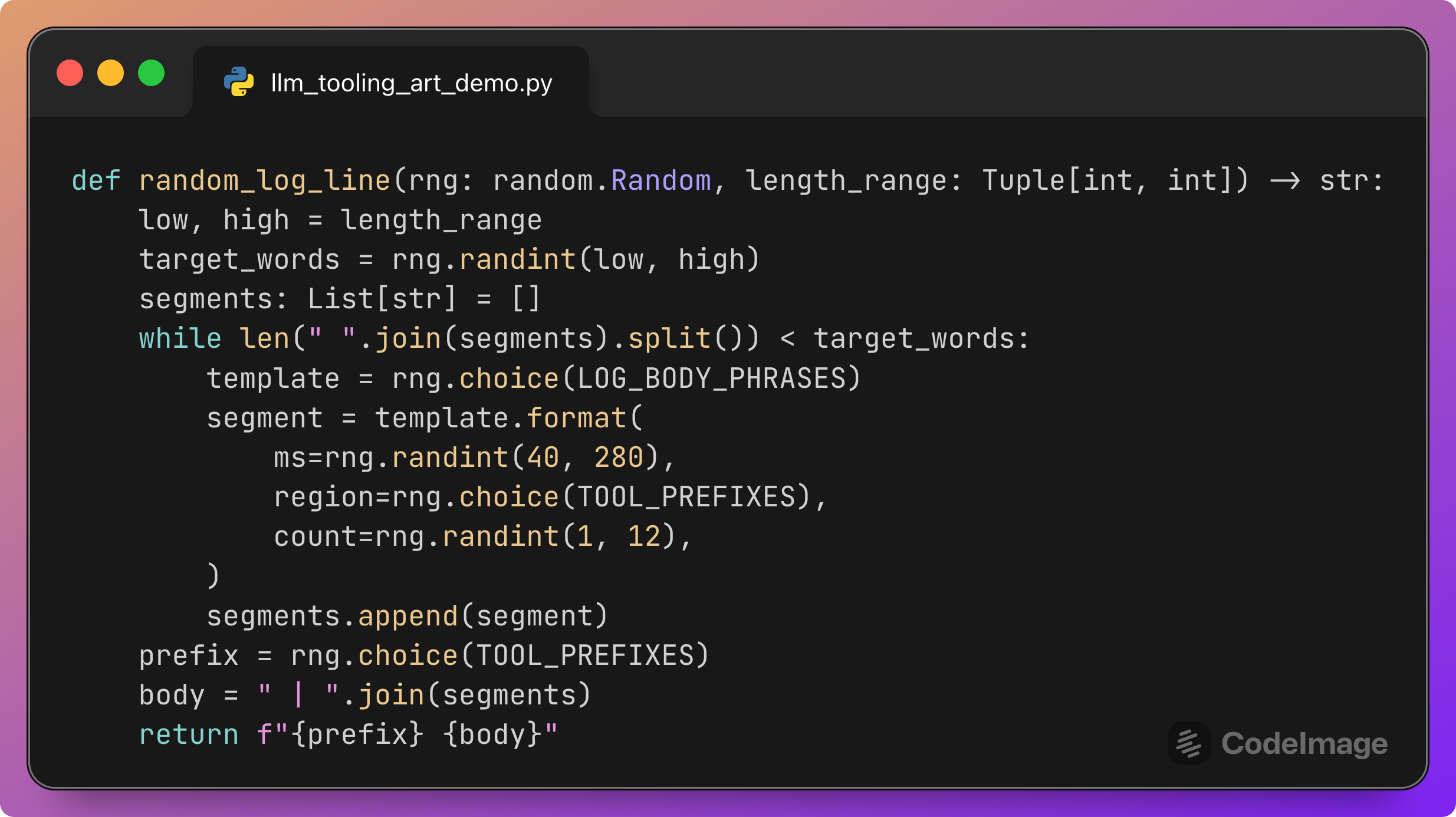
This function:
Picks a random target length in words.
Concatenates randomly chosen body phrases filled with random numbers and tags until that length is reached.
Chooses a random subsystem prefix for the beginning of the line.
Returns a realistic-looking log line such as:
[AUTH] error spike after 120ms handshake in [BILL] | retry queue length 3k and backlog warning in [RISK]
The important property is that many combinations appear:
Different prefixes (
[AUTH],[BILL],[FULF],[RISK],[SUPP]).Different body texts mentioning other tags inside.
This mix gives the model many chances to route tools correctly or incorrectly.
FSCS-ART: selecting the next candidate
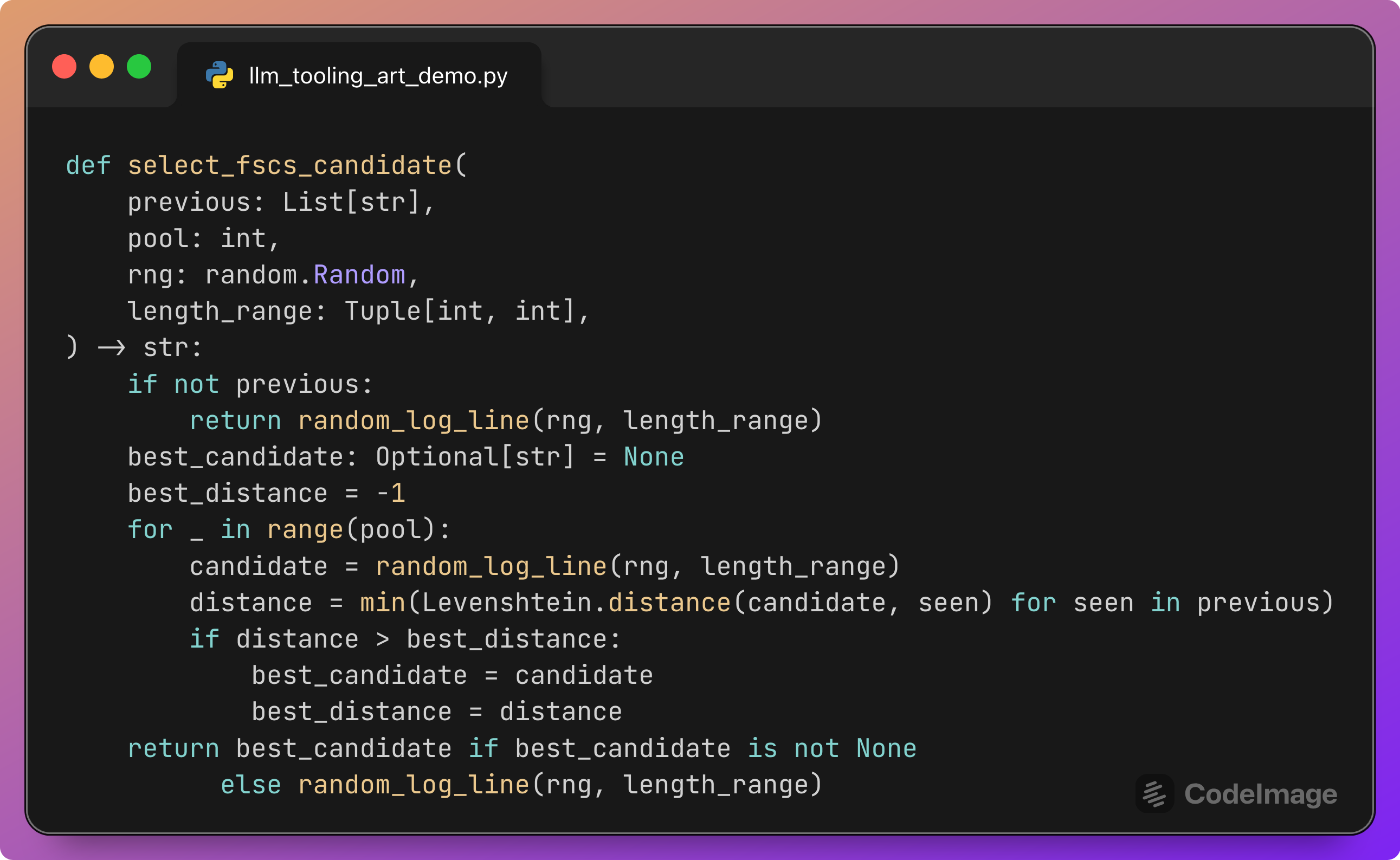
This function implements the Fixed-Size Candidate Set (FSCS) variant of ART.
Algorithm:
If no previous test inputs exist, return a plain random log line.
Otherwise, repeat
pooltimes (for example 10):Generate a random candidate log line.
Compute its Levenshtein distance to each previously tested log line.
Take the minimum of these distances; this is how close the candidate is to its nearest neighbor.
Keep the candidate whose minimum distance to the existing set is maximal.
Return that candidate.
The intuition:
Pure random testing can generate many similar inputs that cluster in one region of the space.
FSCS sampling keeps all the randomness, but always selects the candidate that is farthest from previous tests.
Over time, this produces a more even spread of log lines by content and length.
Here, “distance” is a simple textual metric; in other contexts, it could be embedding distance or domain-specific measures.
Running the Adaptive Random Testing loop
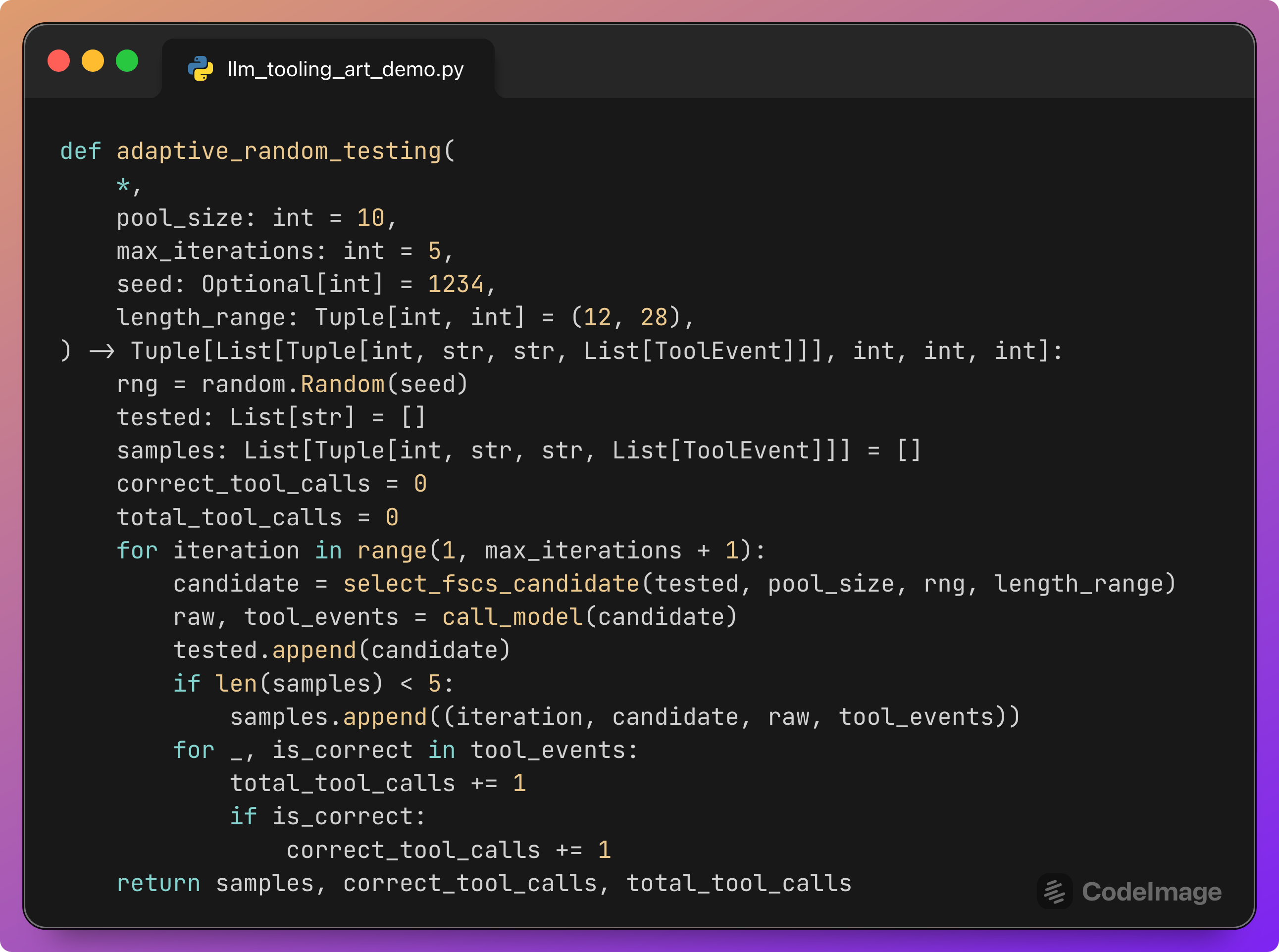
This function ties everything together.
Parameters:
pool_size: how many random candidates to consider at each step.max_iterations: how many test inputs to generate and run.length_range: word length range for log bodies.seed: to reproduce the same sequence.
Loop:
Generate the next candidate using FSCS-ART.
Call the model with that candidate and collect
tool_events.Append the candidate to
testedso future candidates will avoid it.Keep the first few samples (for example 5) so you can inspect them later.
Update
correct_tool_callsandtotal_tool_callsusing the events.
At the end, the function returns:
A short list of sample runs:
(iteration, input, raw_output, tool_events)for manual inspection.The counts needed to compute Tool Call Accuracy.
The model’s text content is preserved only for a few examples, because the main evaluation is driven by the tool event statistics.
Printing sample outputs and Tool Call Accuracy
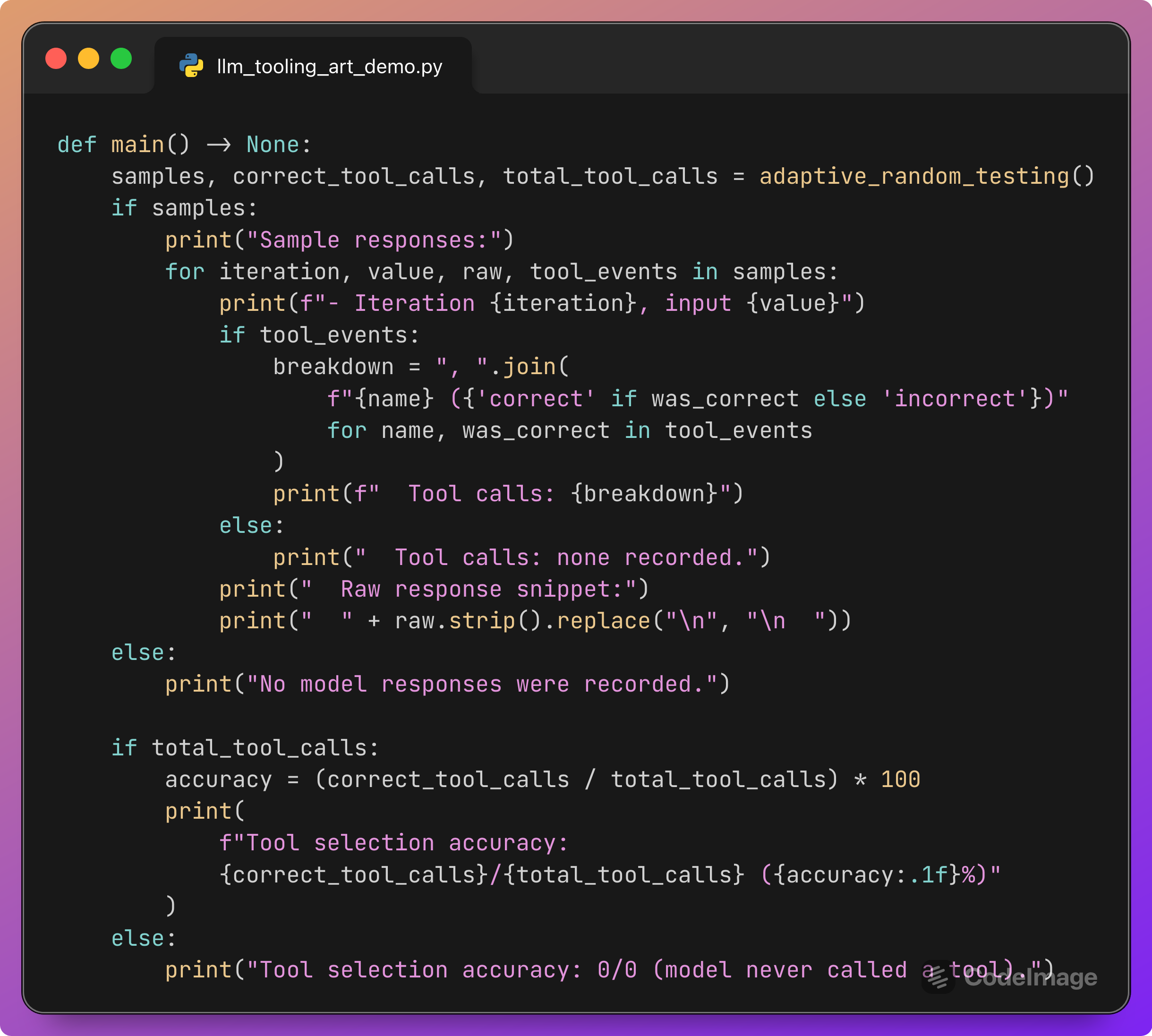
The main function runs the whole experiment and prints a short report.
You see:
A few sample iterations, each showing:
The input log line.
The sequence of tool calls, with each one marked as
(correct)or(incorrect).A snippet of the raw model response.
A final line summarizing Tool Call Accuracy, for example:
Tool selection accuracy: 37/40 (92.5%)
If total_tool_calls is zero, the script tells you that the model never called any tools, which is itself valuable feedback about prompt design.
Why Tool Call Accuracy under ART is useful
Running this harness gives you more than a single number.
It tells you:
Whether the model follows the “call exactly once” and “match the tag” instructions across a wide variety of logs.
How sensitive the behavior is to small changes in wording, length, or internal use of tags in the body.
Whether certain subsystems are especially error-prone.
The combination of ART and Tool Call Accuracy is powerful because:
ART exposes the model to diverse, hard-to-hand-craft inputs, including odd combinations of tags and error phrases.
Tool Call Accuracy converts the messy details of tool calls into a clear, scalar metric over that distribution.
If you change the prompt, tool descriptions, or model version, you can rerun the harness and compare accuracy values. You can also inspect specific failing samples to understand where the routing logic breaks down.
How to adapt this pattern to your own prompts
You can use the same pattern for other agent-style prompts.
The recipe is:
Define the ground truth. For each input, specify which tool (or combination of tools) is considered correct.
Simulate tools when necessary. Replace real side-effecting tools with deterministic, cheap simulators that return realistic JSON.
Write a tool-aware calling function. Encapsulate the model call plus the loop that submits tool outputs.
Record tool events. For each tool call, log the tool name, arguments, and correctness flag.
Design a random input generator. Use domain templates and randomness to generate plausible, varied inputs.
Wrap it in ART. Use FSCS or another ART strategy so that new test inputs are far from previous ones.
Compute metrics. At minimum, track Tool Call Accuracy. For more detailed analysis, you can add:
Tool usage rate (how often any tool is called).
Over-calling rate (how often more than one tool is invoked when only one is allowed).
Response format compliance.
Inspect a few sample runs. Keep some examples for manual reading and debugging.
Each of these steps is visible in the script we walked through. Once you have the harness in place, comparing prompt variants becomes a matter of running a command and reading accuracy numbers.
Why this matters
As LLM systems move from chat demos to operational roles, tool calls become the true actions that matter.
A misrouted telemetry query, a wrongly chosen escalation channel, or a missing “write” action can be far more damaging than a slightly off explanation. Evaluating prompts on a handful of nice-looking examples does not provide a good picture of reliability.
Adaptive Random Testing gives you a practical method to explore the input space more systematically. Tool Call Accuracy gives you a precise, focused signal of whether the model respects your tool-level contract across that space.
The combination fits well into everyday engineering workflows: the harness is a regular Python script, the core logic is a few functions, and the output is a clear metric.
If you try this, share what you find
If you adapt this harness to your own prompts, I would be very interested in what you discover:
Which prompts improve Tool Call Accuracy the most?
Do certain tool sets or naming patterns cause more routing errors?
How many ART iterations do you need before the accuracy curve stabilizes?
If you are experimenting with LLM tools and evaluation, feel free to share your experiences or questions in the comments. If you want to see more concrete testing patterns like this, consider subscribing and restacking this post so others working on LLM reliability can find it too.